

When planning a flooring project, one of the most important questions is:
“How many floor tiles will I need to cover the entire area?”
Calculating tiles accurately is essential to avoid overspending, shortages, and delays during construction. Fortunately, the calculation is simple if you know the right formula.
In this guide, we’ll explain the floor tiles calculation formula in an organized way with practical examples.
Working Process: How to Calculate Floor Tiles Step by Step
Step 1 – Measure the Area of the Floor
- Use a measuring tape to determine the length and width of the room.
- Multiply them to get the floor area in square feet (or square meters).
- Example: A room of 12 ft × 12 ft = 144 sq. ft.
Step 2 – Find the Area of One Tile
Measure the length and width of the tile in inches or centimeters.
Convert to square feet using the formula:

Example: An 18″ × 18″ tile = (18 × 18)/144 = 2.25 sq. ft per tile.
Step 3 – Calculate the Base Number of Tiles
- Use the formula:
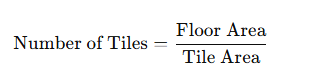
- Example: For a 144 sq. ft room with 18″ × 18″ tiles:
144 ÷ 2.25 = 64 tiles.
Step 4 – Add Extra Tiles for Wastage
- Always add 10% to 15% extra tiles for cutting, breakage, and mistakes.
- Final Number of Tiles = Base Number + Extra (10–15%).
- Example: 64 tiles + 10% = 70 tiles total.
Estimation Formula
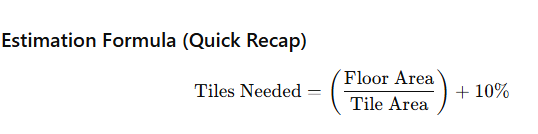
Where:
- Floor Area = Length × Width (sq. ft or sq. m)
- Tile Area = (Tile Length × Tile Width)/144 (if inches)
- 10% Extra = Wastage allowance
Examples of Tile Estimation
Example 1: Room Size 10 ft × 12 ft (120 sq. ft) with 18″ × 18″ tiles
- Floor Area = 10 × 12 = 120 sq. ft
- Tile Area = (18 × 18)/144 = 2.25 sq. ft
- Base Tiles = 120 ÷ 2.25 ≈ 54
- Add 10% = 54 + 5 = 59 tiles needed
Example 2: 100 sq. ft Floor with Different Tile Sizes
| Tile Size (inches) | Tile Area (sq. ft) | Tiles Required (Base) | With 10% Extra |
|---|---|---|---|
| 12 × 12 | 1.00 | 100 | 110 |
| 16 × 16 | 1.78 | 57 | 63 |
| 18 × 18 | 2.25 | 45 | 50 |
| 20 × 20 | 2.78 | 36 | 40 |
| 24 × 24 | 4.00 | 25 | 28 |
Conclusion
Calculating the number of floor tiles is simple if you follow the right steps.
- Measure the floor area (Length × Width).
- Calculate the tile area ((L × W)/144 in sq. ft).
- Divide the floor area by tile area to get the base number of tiles.
- Add 10% extra for wastage and cutting.
👉 Final Formula:
Number of Tiles = (Area of Floor ÷ Area of One Tile) + 10% extra